Make the estimates yours.
Adjust job hours and materials to match how you work. Starting estimates are assumptions, not a promise about every vehicle.
 DetailSum
FOR THE BUSINESS BEHIND THE SHINE
A clean finish. A clearer price. Check what a detailing job leaves per working hour with our free calculator, then build a detailed quote with Complete.
Try it belowYour time. Your costs. Your business.
No signup for the free tool.THE FREE HOURLY CHECK
REMAINING PER WORKING HOUR
—It must cover working-time pay, business overhead and profit. It is not take-home pay or business profit. Taxes are not included.
(Price − direct job costs) ÷ total hours
The starting numbers are an example, not a recommended price. Your calculator inputs stay in this page and are not sent to our server.
DETAILSUM COMPLETE
Set what your working time should earn. Include your costs and a business profit target. See how the price is built before you send it to a customer.
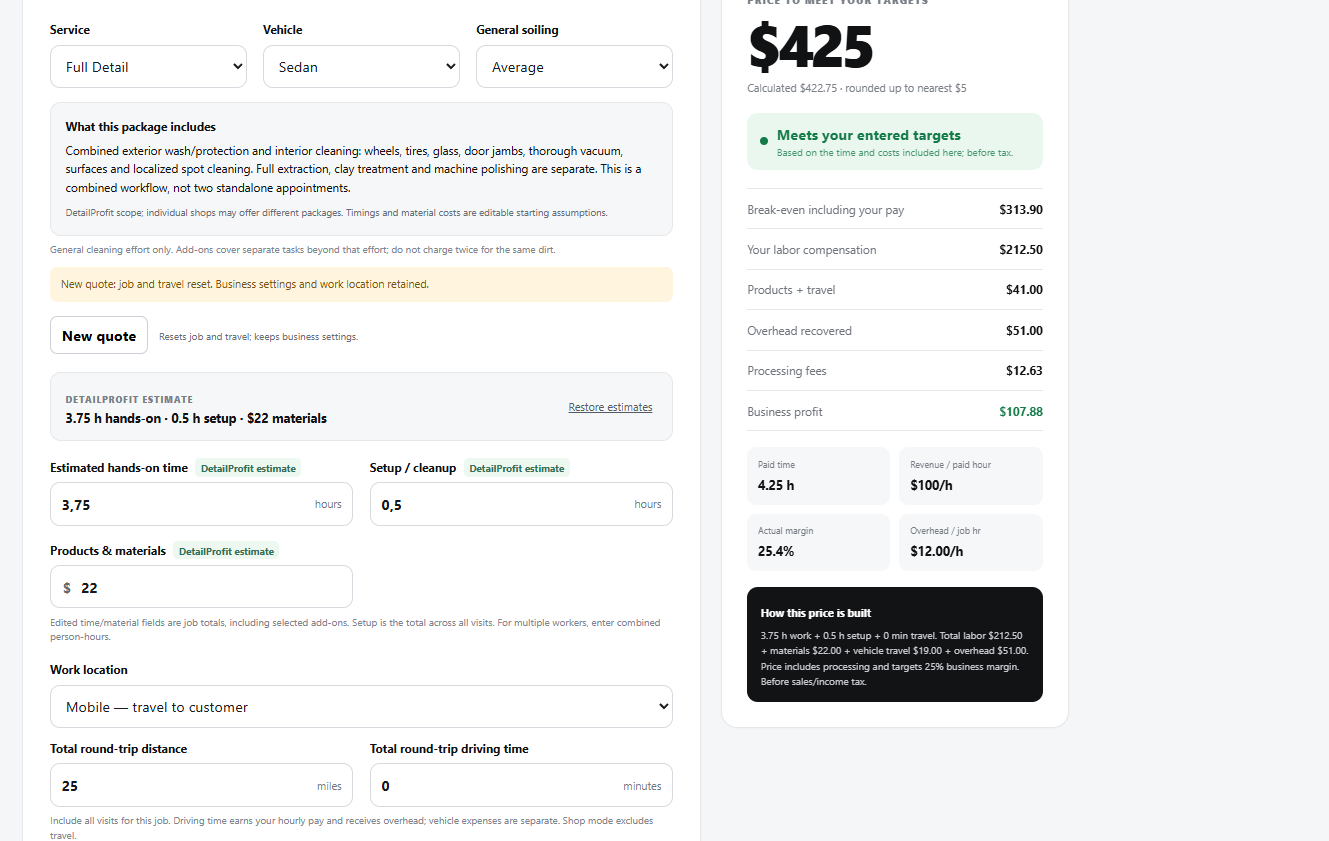
Adjust job hours and materials to match how you work. Starting estimates are assumptions, not a promise about every vehicle.
Save quotes and business defaults in your browser. Download a backup to protect your data or move it to another device.
Add business and customer details. Copy the customer quote or use your browser’s Print / Save PDF option.
| What you can do | Free | Complete |
|---|---|---|
| Quick amount remaining per hour | Yes | Detailed breakdown |
| Quote from your pay and profit target | — | Yes |
| Service estimates and additional work | — | Yes |
| Save quotes and business settings | — | Yes, in your browser |
| Customer quote, copy and print/PDF | — | Yes |
| Backup download and restore | — | Yes |
LAUNCH PRICE · ONE-TIME PURCHASE.
For mobile and shop-based detailers. USD and miles.
14-day money-back guarantee. Applicable checkout taxes may be added.UNDERSTAND YOUR NUMBERS
Start with the work involved: washing, interior cleaning, paint enhancement or ceramic coating preparation. Estimate working time and the materials you will actually use. Include setup and travel where they apply.
For example, a $300 job with $40 in direct costs and five total working hours leaves ($300 − $40) ÷ 5 = $52 per working hour. That amount must still cover your working-time pay, business overhead and profit. It is not take-home pay.
In Complete, enter your working-time pay target, overhead, materials, travel and payment fees, then choose a business profit margin. Review the service scope and edit the starting estimates to match your job. A calculated quote is a planning tool, not a local market price or a guarantee of profit.
Learn how quotes, saved work and backups work, or try the free hourly calculator.
BEFORE YOU BUY
No. It calculates from the job inputs, pay target and costs you enter. Compare the result with your service and market, and decide what to charge.
After purchase on Gumroad, copy your license key and enter it on the customer login page. Complete runs in your browser on a phone or computer. Internet access is required to open and verify access.
Quotes and settings are stored in the browser you use. They do not sync automatically. Download a backup on the original device, then restore that file on the other device. Clearing browser data can remove saved work.
No. Complete prepares customer quotes. Calculations are before sales and income tax; it does not issue tax invoices or process payments from your detailing customers.
Access to the current DetailSum Complete calculator and its listed features, without a recurring subscription. Future separate products or services are not included.